Posts

Game Treatment (Game Progress)

Image
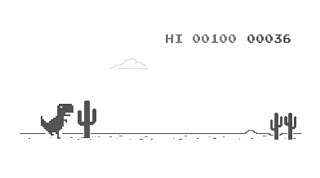
 Game Treatment In my last blog post I discussed different game ideas that I could make for my 2d game project. In this post I will be telling you what game I will make and how I will go about making it. The game design I have decided to go for is the Side Scroller Runner. I like this game idea as I thought it would be the most fun to play and I think there are many ways I can get creative with the game while making it. The GENRE of the game is endless runner. The game will consist of basic things such as terrain, characters, objects and other entities which can be enemies or damaging dealing objects. The goal for the game is to continuously run in one direction ( to the right). The terrain will auto move to the left and the goal for the player is to avoid all obstacles in the way and get as high a score as possible. Objects will appear coming from the right to the left and you the player have to jump over the objects.  I don't plan on putting in any objects that help th...
Game Brainstorm (Project Progress)

Image
 Game Brainstorm For this semesters I have to make a 2D game and as you have seen in previous blog post's I have been actively working on a 2D game called Ruby's Adventure. I have been making this game with the help of unity for the past few weeks and hope to finish it soon. Ruby's Adventure game is a good way for me to hone my skills for making a 2D game and the skills I learned when making that game will greatly assist me with making my own game. This blog post will be a small brainstorm of 3 different types of games that I could make for this project and afterwards I will review my choices and decide on a final game idea that I think will be fairly enjoyable to play. The game has to be 2D so I will take inspiration from other 2d games that I know of. Game 1: Open world game For this game Idea I wanted to keep it simple and create something similar to Ruby's Adventure as it is something that I could make very easily as I already have all the skills needed to make a ga...

Tutorial 05

Image
 Tutorial 05 In this tutorial we played around with the camera and particle effects. This weeks tutorial was definitely easier than last weeks as I only ran into 1 issue which was the camera not following ruby even though I had ruby placed in the follow section in the camera. Other than that issue the rest of the tutorial was fairly straight forward and easy to follow. I liked creating the particle effects as it is cool to see something like that created live and it's something that is constantly active throughout the game when you are playing so you can always see the effects in the game. The particle effects tutorial was very easy to follow along so I didn't have any trouble with it. Next week's tutorial doesn't seem to be very easy so I hope that I'm wrong and it is fairly straight forward as I do not want to be in pain trying to figure out what went wrong. Other than that the game seems to be going well and I have learned a lot while making this 2D Game and hope...

Tutorial 04

Image
 Tutorial 04  This week we looked at projectiles and animations.In my opinion this was by far the hardest lab as I was struggling to follow the guide because I think the guide isn't updated to the current unity studio I use. The guide showed me tabs I couldn't find so I struggled creating the animations. Below is a picture of one of the animations we had to when we had to create and save an "anim" file. I'm not sure if I was reading the tutorial wrong or anything but it was very confusing but I tried my best to create the animation. I got the animation to work but it seemed to be very fast so I moved the key frames up a bit to make the animation a bit slower and more realistic.  We also created projectiles which also confused me a bit because the projectile didn't seem to do anything crazy. When the bullet collided with objects the objects didn't break or anything and I didn't have any code issues so I'm not sure what the problem there was, but the...

Tutorial 03

Image
 Tutorial 03 Going into this week's tutorials I didn't have any expectations for the difficulty of the tutorial. I quickly learned that this tutorial was very fun as this was not something I have done before like creating enemies or made zones that damage the player. I really liked this tutorial because it showed me something new that I haven't done before and this tutorial was very helpful as the skills I learned about health bars will be very useful in the future. In this tutorial we gave ruby a hp statistic and we made and enemy and a damage zone that both deal damage or make ruby lose hp. We made the bot interactive by making ruby be able to push it around. The damage zone was sometimes killing ruby too fast so we had to fix that by making ruby never sleep. This tutorial was fairly straight forward for me as I didn't run into any major issues other than spelling in code but I'm definitely looking forward to continuing these tutorials so I can get better at makin...

Tutorial 02

Image
 My experience on Tutorial 02 This week I continued to do the tutorial on the 2D ruby game. In this tutorial we added decorations to the game such as a metal box which we were able to change the colour of. I made my metal box red and I added other decorations such as a house and a lilypad. Whilest adding the decorations ruby seemed to act weird around the objects so we added rigid bodys and box colliders to the objects and ruby where needed. At one point ruby was jittering and turning weird when colliding with the box but we fixed that by changing the gravity option from 1 to 0 which stopped ruby from rotating on collision with the box. I didn't have any issues with this weeks tasks as the reading was fairly straight forward. I'm now wondering what the final point of this game will be as in what other game mechanics we will add to improve the players experience. In conclusion in this tutorial we added decorations and we figured out ways to make ruby act accordingly around certa...

Tutorial 01

Image
 Tutorial 01 This is the 2nd week in semester 2 and this week for our tutorials we were given the choice between 3 options for tasks to do. I chose to do my tutorials on the first task which was 2D Game Dev on Unity. Going into this tutorial I didn't have any expectations on it if it would be easy or hard. I quickly learned that following the tutorials was a bit more difficult than previously as there was no video guide for it but the writing was easy enough to follow along so it went ok I'm just hoping I don't run into a lot of issues in the future where a video would be helpful but I won't have access to one.  In this tutorial I enjoyed the 2D aspect of creating the game and the scripts seemed very straight forward as I barely had put any information into the script for ruby but when I tested the game ruby would move in all directions when I pressed the following buttons "w,a,s,d". I'm looking forward to the future tutorials to see where this small game ...